
































Size matters, but it is not the only thing that can make or break a shared desk. Legroom, desk depth, cable management, chair clearance, storage, and stability all affect how comfortable the desk feels day after day.
Here are the mistakes to avoid before buying a two-person desk.
Table of Contents
- Two-Person Desk Size
- Mistake 1: Judging the Desk by Width Alone
- Mistake 2: Forgetting About Desk Depth
- Mistake 3: Choosing the Wrong Layout for the Room
- Mistake 4: Overlooking Legroom and Support Bars
- Mistake 5: Underestimating Cables and Power Needs
- Mistake 6: Forgetting About Stability
- Mistake 7: Measuring the Desk, But Not the Chairs
- Mistake 8: Treating Storage as an Afterthought
- Before You Buy: A Simple Checklist
- FAQ
- Final Thoughts
Two-Person Desk Size
|
Setup |
Better 2 People Desk Size |
|
Two laptops only |
60"–72" W x 24" D |
|
One monitor per person |
72"–84" W x 24"–30" D |
|
Dual monitors or gaming setup |
84"–96" W x 30" D |
|
Small room or occasional use |
60" W can work, but keep the setup simple |
Think of a two-person desk as two workstations sharing one surface. That mindset helps you avoid most buying mistakes.

Mistake 1: Judging the Desk by Width Alone
A 72-inch desk sounds roomy, but split between two people, that’s only about 36 inches each. Once you add monitors, keyboards, mouse pads, notebooks, chargers, and coffee mugs, the space fills up fast.
For two laptops, around 30 inches per person can work. For daily work with monitors, 36 to 40 inches per person feels much better.
Also, don’t trust product photos too much. They often show one chair, one laptop, and almost no clutter. Real life usually means two sets of gear, cables, and desk habits.
Mistake 2: Forgetting About Desk Depth
Width tells you how many people can sit there. Depth tells you whether they’ll be comfortable.
A shallow desk may look clean, but it can push your monitor too close and leave little room for your keyboard, arms, or notes.
For basic laptop use, a 24-inch depth is usually fine. For monitors, larger keyboards, speakers, or paperwork, 30 inches is a better choice.
OSHA suggests keeping your monitor about 20 to 40 inches from your eyes, so depth matters more than many people realize.
Mistake 3: Choosing the Wrong Layout for the Room
The best two-person desk layout depends less on the desk itself and more on how the room is used.
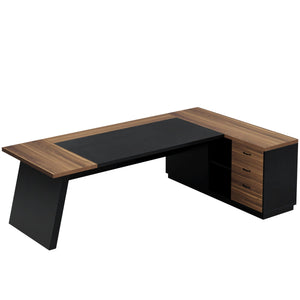
A long side-by-side desk works well against a wide wall and is usually the easiest choice for couples, roommates, or siblings sharing a workspace. An L-shaped desk is better for corners or smaller rooms because it naturally gives each person a separate zone. Back-to-back desks offer more focus, while face-to-face setups can feel collaborative but may become distracting for daily work.
Before choosing a desk, look at the wall space, outlets, windows, chair movement, and natural light. The layout should fit the room first, not the other way around.
Mistake 4: Overlooking Legroom and Support Bars
A desk can be wide enough and still feel uncomfortable if the frame gets in the way.
Center support legs, crossbars, drawers, or low shelves can quietly steal the space where someone’s knees or feet should go. This is especially easy to miss in product photos, where the desk may be styled with only one chair.
Before buying, check the underside of the desk. Both people should be able to sit naturally, pull in their chairs, and move their legs without bumping into storage or metal bars.
Storage is useful, but not if it turns one side of the desk into the bad seat.
Mistake 5: Underestimating Cables and Power Needs
Two people means twice the cords.
Laptops, monitors, chargers, lamps, docking stations, webcams, speakers, and gaming gear can make a shared desk messy fast. A desk with cable holes, space for a power strip, or room to add an under-desk cable tray will be much easier to live with.

Mistake 6: Forgetting About Stability
A two-person desk has to handle more movement than a regular desk.
Two people typing, writing, adjusting monitors, or leaning on the surface can make a weak desk feel shaky fast. This matters even more with monitor arms or heavier setups.
Look for a solid frame, enough center support, a sturdy desktop, and reviews that don’t mention wobbling. The desk does not need to be bulky, but it should match how much equipment will actually sit on it.
A light laptop desk and a shared dual-monitor desk are not built for the same job.
Mistake 7: Measuring the Desk, But Not the Chairs
A desk fitting the wall does not mean the setup fits the room.
Two chairs need space to slide out. Both people need room to stand, move, and pass behind each other without bumping into doors, cabinets, or storage bins.
Before ordering, tape the desk size on the floor and place two chairs in position. Pull them out, sit down, stand up, and walk around.
If the room feels tight during that test, it will feel tighter once the desk arrives.
Mistake 8: Treating Storage as an Afterthought
Shared desks get messy when storage is not planned.
Each person needs a place for their own supplies, whether that is a drawer, shelf, side cabinet, or desktop organizer. The type of storage matters less than the balance. One person should not get all the drawers and legroom while the other gets the leftover corner.
Open shelves work well for books and baskets. Drawers are better for small office items. A hutch can save space, as long as it does not crowd the monitors.
Good storage should make sharing the desk easier, not more annoying.

Before You Buy: A Simple Checklist
Use this checklist before choosing a two-person desk:
|
Question |
Why It Matters |
|
Does each person get at least 30" of usable width? |
Prevents cramped work zones |
|
Is the desk at least 24" deep? |
Gives enough room for screens and arms |
|
Will two chairs fit comfortably? |
Avoids awkward seating |
|
Are there bars, shelves, or drawers blocking legroom? |
Protects daily comfort |
|
Is there a plan for cables and power strips? |
Keeps the setup clean |
|
Is the frame stable enough for two setups? |
Reduces wobble |
|
Does each person have storage? |
Makes the desk easier to share |
|
Does the layout fit the room, not just the wall? |
Keeps the whole space usable |
FAQ
Is a 60-inch Desk Big Enough For Two People?
Yes, but only for light use. A 60-inch desk can work for two laptops, two students, or occasional work. For two adults using monitors, it will likely feel tight.
What is The Best Size Desk for Two People?
For most shared home offices, 72 to 84 inches wide and 24 to 30 inches deep is a practical range. Go wider or deeper for gaming, dual monitors, or daily full-time work.
Is One Long Desk Better Than Two Separate Desks?
One long desk saves space and creates a cleaner look. Two separate desks offer more flexibility and personal separation. For small rooms, one shared desk usually makes better use of the wall.
What Depth is Best for a Two-person Computer Desk?
A 24-inch depth is a solid minimum. A 30-inch depth is better for external monitors, monitor arms, writing space, and long work sessions.
What Layout Works Best for a Small Shared Office?
A side-by-side desk along a wall is usually the easiest layout. An L-shaped desk works well in a corner if each person needs a more defined zone.
Final Thoughts
Buying a two-person desk is not about finding the longest surface available. It is about creating two comfortable work areas that happen to share one piece of furniture.
The right desk gives both people enough width, enough depth, clear legroom, stable support, simple cable management, and fair storage. When those basics are right, the space feels easier to use every day.
For shared home offices, study rooms, gaming setups, or family workspaces, start with size and comfort first. Style can come after.
Read more:
Tribesigns Two Person Desk Assembly Guide
How to Choose the Right Two Person Desk?