



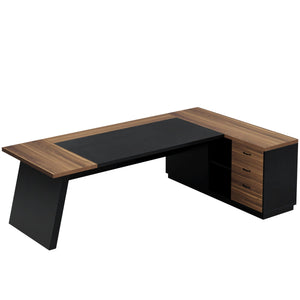








A great gaming desk gives you space to play, comfort to focus, and cable organization.
120×60cm minimum for single monitors, 140×70cm+ for dual/ultrawide, 150×80cm or L-shaped for triple screens. Below, we break down gaming desk types, what to look for, and top picks—including why Tribesigns is worth considering.
Table of Contents
What Kind of Desk Is Best for Gaming?
Not every desk labeled "gaming" is actually better. The best desk matches your setup size, room layout, and how you use it (gaming only, or gaming + work).

5 Desk Types and Who They're For
|
Type |
Size Recommendation |
|
120–150cm + wing |
|
|
Standard straight desk |
120×60cm minimum |
|
Standing/motorized desk |
140×70cm+ |
|
Compact desk |
~120×50cm (4 ft) |
|
Minimalist desk |
120×60cm |
What to Look for in a Gaming Desk?
You can skip the "gaming" label and still get a perfect setup. These 6 factors matter more than RGB lights or brand names.
Size & Surface Area
Your desk needs to hold your gear plus leave room for your hands, controller, and maybe a snack.
- Single monitor: 48×24 inches minimum
- Dual monitor/ultrawide: 55×28 inches+
- Triple monitor: 60×32 inches or L-shaped
Measure your room and equipment. Leave ~12 inches leg clearance so you don't feel cramped.
Build Quality & Materials
A shaky desk ruins focus. Go for steel frames with solid surfaces.
|
Material |
Pros |
Cons |
|
Steel + MDF |
Stable, affordable |
Less durable than wood |
|
Solid wood |
Durable, premium feel |
Expensive, heavy |
|
Carbon fiber |
Lightweight, modern |
Fragile |
|
Glass |
Looks sleek |
Heavy, breaks easily |
Weight capacity guide:
- Single monitor: ≥50 lbs
- Dual + heavy gear: ≥100 lbs
- Heavy setups (e.g., Tribesigns 63"): 900 lbs capacity
Avoid wobbly desks. Check reviews for "sturdy" or "doesn't shake" comments.
Cable Management
Good cable management keeps a workspace tidy, safe, and distraction-free. Features like cable trays and grommets help hide and organize wires, while simple accessories can provide a similar solution if they are not built in.
Ergonomics
A desk should support a comfortable, natural posture to reduce fatigue and improve productivity. Features such as height adjustment, sufficient legroom, and rounded edges can enhance comfort, while regular movement breaks help maintain focus throughout the day.
Extra Features (Choose Wisely)
Don't buy flashy extras that don't help. Pick features that solve real problems.
- RGB lights
- Cup holder
- Headphone hook
- USB hub
- Wireless charging
- Monitor shelf
Tribesigns 75": Includes LED strip + monitor shelf + headphone hook.

Budget
Price ranges are wider than you think. You don't need to spend $1,000.
Read more: What Is a Reasonable Price for a Desk?
|
Tier |
Price Range |
|
Budget |
$100–$200 |
|
Midrange |
$200–$400 |
|
Luxury |
$400–$1,000+ |
Why Consider Tribesigns for Gaming?
Tribesigns offer 300+ desk types (computer desks, L-shaped, executive, etc.). But several models work perfectly for gaming setups.
75" Black Gaming Desk:
75 inches of workspace gives it a distinctly open layout, making it easy to set up multiple monitors, peripherals, and gaming essentials without crowding the surface.

An integrated LED light strip introduces subtle ambient lighting, adding depth to the environment and making evening sessions feel more engaging. The raised monitor stand naturally brings the screen closer to eye level, which helps maintain a more relaxed viewing posture over longer periods.
Small but practical details like accessory hooks and basic cable organization features help reduce visual clutter and keep the setup more controlled. The result is a desk that feels spacious, organized, and geared toward both performance and atmosphere.
|
Advantage |
What It Means |
|
Massive desktop space |
75", 63", L-shaped dual surfaces fit 2–4 monitors |
|
Unbeatable value |
$149.99–$209.99, far below Secretlab and gaming brands |
|
Heavy-duty capacity |
Steel frame, 330–600 lbs, stable no-wobble |
|
Multi-purpose use |
Gaming + work + study, high room efficiency |
|
4.5-star reviews |
Users say "sturdy, huge, doesn't shake or rattle" |
Best for: Budget buyers, large-desk seekers, gaming-work hybrids.
Read more: 5 Best L-shaped Gaming Desks Under $350 (Update)
FAQ
What's the Best Size For a Gaming Desk?
Depends on your space and monitor count:
- Single: 48×24 inches minimum
- Dual/ultrawide: 55×28 inches+
- Triple: 60×32 inches or L-shaped
Is a Gaming Desk Worth It?
Yes. Dedicated desks improve posture and reduce fatigue from long sitting.
Do I Need a Sit-stand Desk?
Movement is key, but sit-stand desks help best. Move 5 minutes every hour.
What's the Best Budget Gaming Desk?
Tribesigns 75" Gaming Desk with LED Strip ($169.99)—huge space, LED, unbeatable value.
Are Tribesigns Desks Good For Gaming?
Yes. Many Tribesigns desks are well-suited for gaming setups, offering generous desktop space that easily supports multi-monitor configurations, keyboards, and other gaming gear without feeling cluttered. The layout tends to prioritize openness and usability, which helps maintain a cleaner and more organized setup during extended use.