



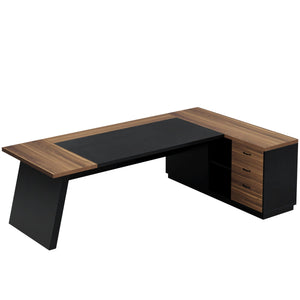


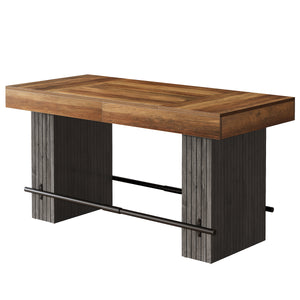

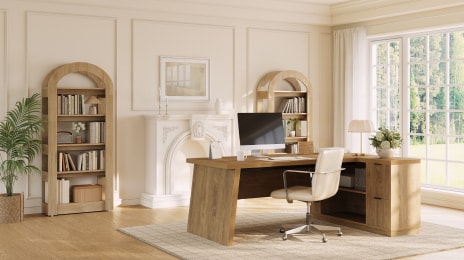




Thank you for choosing our JW1088 55" Executive Desk with Double Trapezoid Base—our best value executive desk. This desk combines a spacious work surface with a bold, modern base that fits both home and office settings. In this guide, we’ll walk you through the assembly process step by step, from checking the parts and hardware to completing the final setup, so you can put your desk together quickly and correctly.
Parts List
Before assembly, please check all panels and hardware against the lists below to make sure everything is included and undamaged.

|
Part No. |
Qty. |
Hardware No. |
Qty. |
Hardware Specification |
|
1 |
2 pcs |
A |
57 pcs |
Ø6 × 40 mm |
|
2 |
1 pc |
B |
57 pcs |
Ø15 × 12 mm |
|
3 |
2 pcs |
C |
17 pcs |
Ø8 × 30 mm |
|
4 |
2 pcs |
D |
13 pcs |
M6 × 50 mm |
|
5 |
2 pcs |
E |
13 pcs |
M6 × 25 mm |
|
6 |
2 pcs |
F |
9 pcs |
M6 × 12 mm |
|
7 |
2 pcs |
G |
8 pcs |
Ø21 mm |
|
8 |
2 pcs |
H |
1 pc |
M4 |
|
9 |
2 pcs |
13 |
4 pcs |
— |
|
11 |
4 pcs |
J |
9 pcs |
Ø3.5 × 14 mm |
|
12 |
2 pcs |
K |
9 pcs |
M6 × 20 mm |
|
14 |
2 pcs |
How to Install Cam Locks and Pins?
Before starting the assembly, please familiarize yourself with how to install the cam locks and pins correctly. These fasteners are used throughout multiple steps of the installation process. Proper installation will help prevent misalignment, loose connections, or damage to the panels. Please use a manual screwdriver only and do not use an electric screwdriver during assembly.
Step 1-2: Align the plastic part with the mounting hole and press it in. If you can't press it in,
loosen the screw counter clockwise or completely remove the screw from the plastic part and try again.
Step 3-4: After pressing the plastic part into place, use a screwdriver to tighten the screw clockwise.
Screw the pin into the hole.Set the cams correctly by aligning the head of the cams with the lockpins. Lock the cam by turning the cam head with a screwdriver until it is tightened.

Step 1: Install the Cam Bolts Into Panels 6 and 7
Take both Part 6 panels and both Part 7 panels.
Screw the A cam bolts into the pre-drilled holes shown in the diagram.
- Install 6 cam bolts into each Part 6 panel
- Install 6 cam bolts into each Part 7 panel
- Total used in this step: 24 pcs of A
Make sure each cam bolt is tightened securely, but do not overtighten. A manual screwdriver is recommended.
Step 2: Build Each Side Support Assembly With Parts 6, 8, 9, and 7
Each side support is made from:
- 1 × Part 6
- 1 × Part 8
- 1 × Part 9
- 1 × Part 7
Start with Part 6 laid flat.
- Insert the wood dowels (C) into the indicated holes on Part 6.
- Insert the cam locks (B) into the large round holes on Parts 8 and 9.
- Position Part 8 and Part 9 onto Part 6, aligning the dowels and cam bolts with the matching holes.
- After the lower connection is aligned, place Part 7 on top.
- Align the top holes carefully so that Part 7 fits onto Parts 8 and 9.
- Once everything is fully seated, tighten the cam locks (B) to secure the structure.
Repeat the same process to build the second side support assembly.
Step 3: Join Parts 3 and 4 to Make Two Long Rails
Take one Part 3 and one Part 4 and place them together end to end, aligning the center holes.
Then position Part 14 over the joint as the reinforcement plate.
Use 6 pcs of E bolts to fasten Part 14 securely in place.
Repeat the same process with the second set of Part 3 + Part 4 to create the second long rail.
After this step, you should have:
2 assembled long rails
each rail made from Part 3 + Part 4 + Part 14
Use the included Allen key (H) to tighten the bolts.

Step 4: Install Cam Bolts Into Both Ends of The Assembled Rails
Next, screw A cam bolts into the pre-drilled holes at both ends of each assembled long rail.
- Install 2 cam bolts at one end
- Install 2 cam bolts at the other end
Repeat for both rails.
Total used in this step: 8 pcs of A
Make sure all cam bolts are fully inserted and straight.
Step 5: Connect the Two Long Rails With Parts 5
Now take the two Part 5 panels and insert the B (8 pcs)cam locks into the large round holes.
Then connect the two long rails to the two Part 5 panels to form a rectangular frame.
As you assemble:
- Align the cam bolts at the ends of the long rails with the matching holes in Part 5
- Push the panels together carefully until the joints sit flush
- Turn the B cam locks to secure the connections
Once tightened, the upper frame should form a stable rectangle.
Important assembly note
Before fully tightening everything, make sure:
- all edges are aligned evenly
- the frame sits square
- the pre-drilled holes are facing the correct direction for the next installation steps
Do not overtighten the cam locks.
Step 6: Join the Three Desktop Panels
Lay out the desktop panels in this order:
- Part 1
- Part 2
- Part 1
Make sure the panel edges are aligned evenly so the full desktop forms one flat surface.
Next, place the 4 connecting plates (Part 13) across the joints on the underside of the desktop:
- 2 plates between the left Part 1 and Part 2
- 2 plates between Part 2 and the right Part 1
Secure the connecting plates using 8 pcs of J screws.
This step holds the three desktop panels together and keeps the full top aligned for the next stage.

Step 7: Install Cam Bolts into the Underside of the Desktop
With the desktop still upside down, screw 24 pcs of A cam bolts into the pre-drilled holes on the underside of the assembled desktop.
These cam bolts will be used in the next steps to connect:
- the upper frame
- the two side support assemblies
Make sure all cam bolts are installed straight and tightened securely by hand with a manual screwdriver.
Step 8: Attach the Upper Frame to the Underside of the Desktop
Take the assembled upper frame from the previous section and position it on the underside of the desktop.
Carefully align the frame so that the holes in the frame match the pre-installed A cam bolts on the desktop.
Once the frame is properly seated:
- Insert 16 pcs of B cam locks into the large round access holes in the frame
- Make sure each cam lock is facing the correct direction to catch the cam bolt
- Tighten all cam locks to secure the frame to the desktop
At this point, the rectangular upper frame should be firmly attached to the underside of the desktop.
Step 9: Attach the Two Side Support Assemblies
Now take the two completed side support assemblies built earlier and install them onto the underside of the desk.
Position each support assembly in its correct location inside the frame, aligning the holes in the support panels with the remaining pre-installed cam bolts on the desktop.
When placing the supports, pay close attention to orientation:
- the angled outer panels (Part 8) should face outward
- the left and right support assemblies should mirror each other
- the wider outer faces should follow the final desk shape shown in the product image
After both support assemblies are aligned:
- Insert the remaining 8 pcs of B cam locks into the accessible side holes
- Tighten the cam locks evenly
- Confirm that both support assemblies sit flush against the underside of the desktop and inside the frame

Step 10: Build the Two Center Support Bars
Use two Part 11 panels and one Part 12 connector to make one long support bar.
Repeat the same process to make the second one.
To assemble each support bar:
- Place two Part 11 pieces end to end.
- Position Part 12 over the center joint as the connecting piece.
- Use 4 pcs of F bolts to fasten the connection securely.
Tighten fully with the included Allen key (H).
After this step, you should have:
- 2 completed center support bars
- each one made from 2 × Part 11 + 1 × Part 12
Make sure the connector is centered and the full bar is straight before tightening.
Step 11: Install the Ttwo Center Support Bars Between the Side Supports
Position the two assembled support bars inside the middle section of the desk base, between the left and right side support assemblies.
Align the mounting holes carefully, then secure the bars using 12 pcs of D bolts.
- Install the bars in the positions shown in the diagram
- Tighten all bolts evenly with the Allen key (H)
- Make sure both bars sit level and parallel
These bars reinforce the structure and stabilize the center of the desk.
After the two center support bars are in place, install 8 pcs of K bolts into the indicated side mounting points to further secure the inner structure.
Tighten all bolts firmly, but do not overtighten.
At this point, the entire base should feel solid, with no loose movement between the side supports and center bars.
Once all bolts and cam locks have been tightened, place the 8 pcs of G hole cover stickers over the exposed cam lock openings.
This gives the desk a cleaner finished appearance and helps conceal visible hardware.
Step 12: Turn The Desk Upright and Complete the Assembly
With all internal supports installed and fully tightened, carefully turn the desk upright.
It is recommended that two people lift and rotate the desk to avoid strain or damage.
After standing the desk upright, do a final check:
- confirm the desktop panels are flush
- make sure the desk stands level
- recheck all bolts and cam locks
- verify that both side supports are aligned correctly

Your executive desk is now fully assembled and ready for use. If you encounter any issues with this product, such as missing or damaged parts, we're here to help.
Read more:
Tribesigns 55" Executive Desk Double Trapezoid For Small Office

