












What Are the Benefits of Standing Desks?
Switching from a traditional sitting setup to a standing desk can significantly impact your health and daily energy levels. According to ergonomic research and public health studies:
- Improved circulation and posture: Standing periodically can reduce slouching and muscle strain.
- Lower risk of chronic diseases: Prolonged sitting has been linked to type 2 diabetes, cardiovascular issues, and obesity.
- Increased productivity and focus: Alternating positions throughout the day keeps your body engaged and your brain alert.
That said, just standing for long hours isn’t the solution—it’s about how you balance movement throughout your workday.

What Is the 20-8-2 Rule?
The 20-8-2 rule is a simple yet powerful guideline created by ergonomics experts to help office workers structure their day for better health.
Here’s how it works in every 30-minute block:
- Sit for 20 minutes
- Stand for 8 minutes
- Move around for 2 minutes
Rather than standing for hours straight or sitting all day, this cycle promotes small, frequent shifts in posture. That movement is what improves circulation, prevents joint stiffness, and combats fatigue.
The rule is backed by research from Dr. Alan Hedge at Cornell University, who found that these short activity intervals result in fewer aches and better energy levels.
Why the 20-8-2 Rule Works?
The power of the 20-8-2 method lies in balance:
- Standing too long can cause lower back stress, swollen legs, and fatigue.
- Sitting too long leads to poor posture, reduced metabolism, and increased risk of disease.
- Moving regularly helps with mental refreshment and physical recovery.
This cadence ensures that your body never stays in one position long enough to cause harm. Over an 8-hour workday, you’ll cycle through 16 sessions—offering your body consistent micro-breaks.

How Long Should You Actually Stand?
Most experts recommend standing for 5 to 15 minutes per hour. Standing longer than that, especially without movement, can strain your knees and feet.
Here’s a general breakdown:
- Begin with short intervals: Try 5-minute standing breaks each hour, then gradually build up.
- Use your comfort as a guide: If you feel tension in your legs or feet, sit and shift positions.
- Aim for a total of 2–4 hours standing throughout the workday—interspersed with sitting and walking.
Avoid turning your standing desk into an all-day standing post. It’s meant to support a more dynamic, flexible workflow.
How Should You Stand at a Standing Desk?
Standing isn’t just about getting upright—it’s about standing correctly. A proper stance helps prevent back strain, improves posture, and ensures you get the full benefit of your standing desk.
How to Align Your Spine While Standing
Your spine should remain in a neutral position, which means:
- Ears aligned over shoulders
- Shoulders aligned over hips
- Hips aligned over ankles
Avoid pushing your hips forward, arching your lower back, or leaning into the desk. Think of your spine as a straight, gently curved column—balanced and upright.
Maintaining Proper Spinal Alignment Throughout the Day
Even with good posture, standing fatigue can creep in. Here are tips to stay aligned:
- Shift your weight occasionally from one foot to the other
- Use a footrest to alternate support
- Engage your core slightly to reduce lower back tension
- Don’t lock your knees—keep a soft bend
Movement is part of alignment. If you feel discomfort, that’s your cue to switch positions.
Optimal Arm and Elbow Position at a Standing Desk
Your arm position affects not only your shoulders, but also your wrists and upper back.
- Keep elbows at a 90-degree angle, close to your sides
- Forearms should rest parallel to the desk
- Shoulders should remain relaxed—not hunched or lifted
- Wrists should stay straight, not bent upwards or down
If your arms feel strained after a while, reassess the desk height or consider a keyboard tray.
Where Should You Position Your Arms and Hands?
- Keyboard and mouse should sit flat, at elbow level
- Wrists should hover slightly or rest lightly on a padded surface
- Keep your mouse close to avoid overreaching
Good alignment reduces strain and supports long-term joint health—especially during extended work sessions.

Ideal Ergonomic Setup with a Standing Desk
Maximize comfort and reduce strain by setting up your workspace properly:
- Elbows at 90 degrees: Whether sitting or standing, keep your forearms parallel to the desk surface.
- Monitor at eye level: The top third of your screen should be aligned with your eyes.
- Wrist posture: Keep wrists straight and neutral while typing.
- Feet flat and weight evenly distributed: Avoid leaning or locking knees while standing.
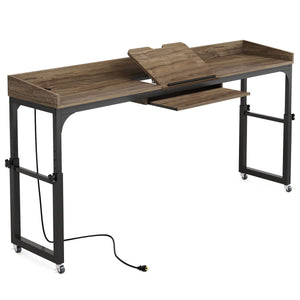
Tribesigns desks offer the stability and space to accommodate monitor arms, keyboard trays, and other ergonomic add-ons.
Why a Manual Adjustable Desk Might Be the Better Choice?
While electric standing desks are common in corporate settings, manual adjustable desks offer several distinct advantages:
- More affordable – Ideal for home offices or budget-conscious users
- Lightweight and mobile – Easy to move between rooms or store when not in use
- No power required – Use it anywhere, no need for outlets or cable management
- Simple to use – Quick adjustments with knobs or levers, no complicated programming
Tribesigns standing desks are built for versatility—whether you're working in your living room, kitchen, or dedicated office space.
Common Mistakes to Avoid
Even with the right desk, bad habits can undo your efforts. Watch out for these:
- Standing too long: It’s just as harmful as sitting too long—balance is key.
- Skipping the “move” part: Two minutes of motion matters. Take a lap, stretch, or do toe raises.
- Using poor footwear: Flat or unsupportive shoes will hurt during standing sessions.
- Slouching while standing: Yes, posture still counts—stand tall.
Be mindful of how your body feels and adjust accordingly.
FAQs
How Many Hours Should I Stand at a Standing Desk Per Day?
Aim for 2–4 hours of standing spread throughout your workday, broken into short periods.
Is it Bad to Stand All Day At a Desk?
Yes. Prolonged standing can cause joint strain and fatigue. It’s healthier to alternate frequently.
Can Standing Help Me Lose Weight or Belly Fat?
Not by itself, but standing burns slightly more calories than sitting. When paired with regular movement and better habits, it contributes to a healthier lifestyle.
Do I Need An Anti-fatigue Mat?
Highly recommended. It cushions your feet and encourages subtle movement, reducing pressure on your legs.